OrgChart

UKG ORG CHART INTEGRATION

Turn Your UKG Data Into an Automatically Updated Org Chart
OrgChart connects directly to UKG Pro and UKG Ready and turns your employee data into a live org chart that shows who reports to whom. It is built for HR and People Ops teams that already use UKG and want a clearer picture of their structure without rebuilding charts by hand.

Trusted By Thousands to Chart Millions

American Association of Motor Vehicle Administrators Logo
Avidbank Logo
Baldwin Wallace University Logo
Chicago Public Schools Logo
Citadel Logo
City and County of San Francisco Logo
Edelman Financial Engines Logo
Edible Arrangements Logo
Ernst & Young Logo
Federal Reserve Bank of New York Logo
Goodwill Logo
Holyoke Community College Logo
IMB Bank
Leukemia & Lymphoma Society Logo
Makino Logo
Missouri Deparment Of Natural Resources Logo
National Institutes of Health Logo
Nebraska Humane Society Logo
New York City Administration For Children's Services Logo
Northwestern University Logo
Ocean Conservancy Logo
Park Place Technologies Logo
State of Ohio Logo
Subway Logo
Sunkist Logo
Susan G. Komen Brand Logo
Texas Christian University Logo
United States Department Of Justice Logo
Valley Bank Logo
Virginia Polytechnic Institute and State University Logo
Washington State University Logo

The OrgChart and UKG Integration Allows You To
SHARE YOUR UKG ORG CHART

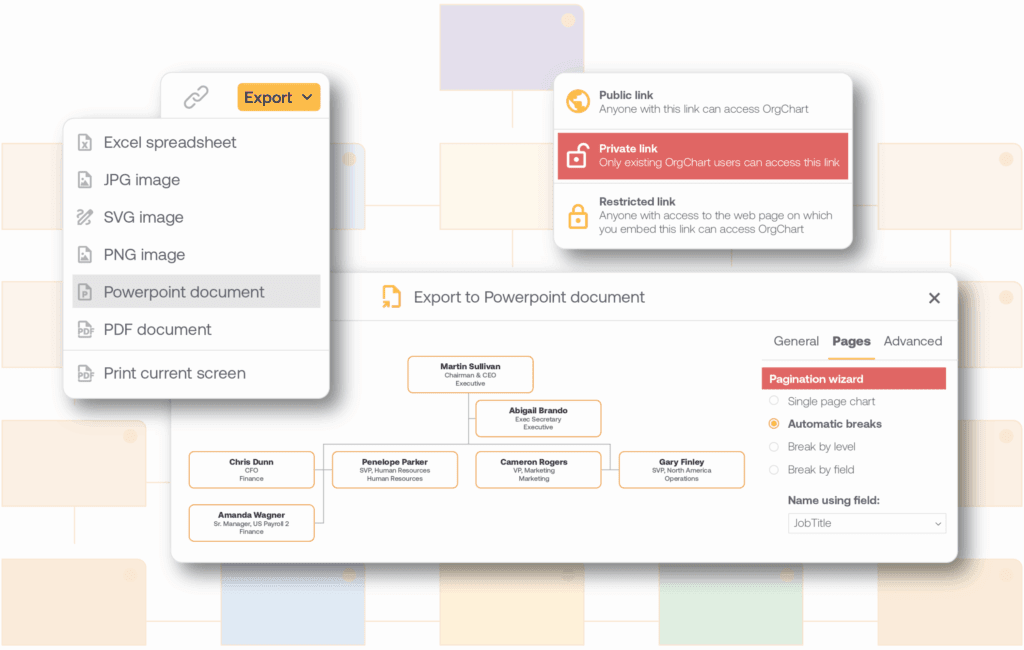
Share Your UKG Org Chart as a PowerPoint, PDF, or Link

Once your UKG data is synced, export your org chart to PowerPoint, PDF, Excel, PNG, JPG, or SVG, or share it as a web link. Large charts can be split across pages, so they’re ready for a leadership deck. Control who can open each link, so only the right people see your UKG org chart.

Does OrgChart Replace UKG’s Native Org Chart?

No. OrgChart works alongside UKG, and UKG remains your system of record for HR and payroll data. OrgChart is built for modeling a reorg, customizing views, and sharing structure with leaders who don’t log into or work within UKG.
CUSTOMIZE YOUR UKG ORG CHART

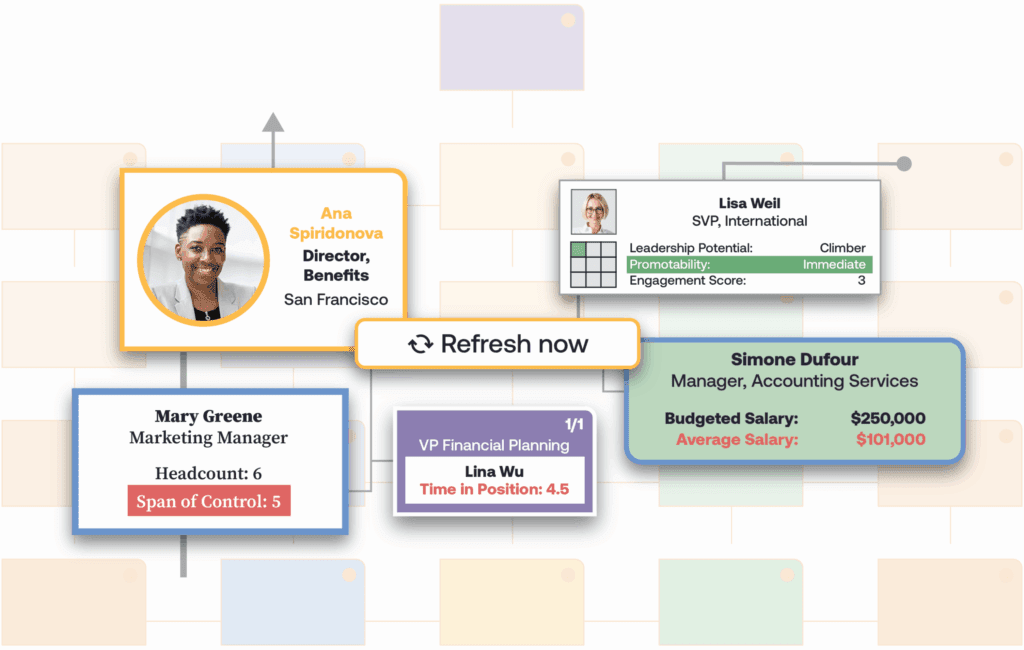
Visualize Your UKG Data Your Way

Analyze your workforce data in an org chart with colors, filters, highlights, calculations, pictures, logos, and more.
PLAN WITH YOUR UKG DATA

Plan Reorgs and Headcount Changes with Your UKG Data

Start from your current UKG org chart and model what comes next. Build scenarios with employee and position data, and see headcount, span of control, and budget impact for each option before anything is final. UKG stays your system of record, and your scenarios live in OrgChart.

What You Can Do with Your UKG Data in OrgChart

TaskWhat OrgChart adds to your UKG data
Plan a reorg or headcount changeScenario plans for workforce planning, built on employee and position data
Centralize workforce visibility across multiple systemsMerge UKG data with a second source, such as an ATS, using any of our 50+ HR data integrations
Customize the chartColors, filters, highlights, calculations, and photos
Share the chartPDF, PowerPoint, PNG, JPG, SVG, Excel, web link, or intranet embed

UKG Integration: Step-by-Step

Connect
STEP 1

Connect

Link your UKG account to OrgChart and select which data OrgChart can read.

Refresh
Step 2

Refresh

OrgChart pulls your UKG data and keeps it current on the schedule you set.

Visualize
Step 3

Visualize

Build, customize, and share your UKG org chart from the synced data.

FAQ

Yes. OrgChart integrates with UKG Pro, through either the UKG Pro API or the RaaS (Reports as a Service) interface, and with UKG Ready. Each connection pulls employee data into automated org charts that refresh on the schedule you set.

OrgChart is an org chart tool, not a BI or analytics dashboard. An org chart shows structure: who reports to whom and how teams are organized. A BI dashboard shows numeric metrics such as totals and trends. OrgChart builds your org chart from your UKG data and does not replace the numeric dashboards and reports in UKG. Teams use it for customizing and sharing org visibility with colors, filters, and exports.

OrgChart uses employee records from UKG, such as names, job titles, departments and supervisors, to build your org chart. What it can read depends on the permissions and settings you set in UKG.

You control what OrgChart can read through the permissions you set in UKG, and what each viewer sees in a shared chart. OrgChart offers enterprise-grade security with granular settings, so the data in your UKG org chart is only accessible to authorized people.

Free · Instant Access

Take a 3-Minute Tour of OrgChart

Click through the real product at your own pace: connect your HR system, build the chart, share it and plan a reorg. No call, no download.

By continuing, you agree to receive emails from OrgChart about our product, events and HR resources. Unsubscribe anytime. Privacy Policy

4.5 · 300+ reviews Portland Trail BlazersUSPSAbbVieSherwin-Williams

Want to try it yourself? The 3-Min Product Tour lets you click through every feature.

Want results like these? See OrgChart in a free live demo.

Ready for a live look? Book a free 30-minute demo with a product expert.

Get a Free Live Demo

Free DemoSee OrgChart in Action

Book Your Demo

See how OrgChart can save you time and enhance your organizational insight.

  • Personalized TourTailored to your chart needs
  • Clear PricingA quote that explains the ROI
  • Invite Your TeamAdd your HR, Finance, or People Leaders
4.5 from 300+ reviews
Free Live Demo · 30 min Your Email
Where Should We Send Your Demo?
Tell Us a Little About Your Team

We’ll send the invite to

Pick a Time for Your Live Demo

Times shown in your time zone · 30 minutes

Request Received

Please note, OrgChart’s annual pricing begins at $1,249 USD. If you’d still like a live demo, pick a time that works for you.

Book a Demo

You’re Booked

A calendar invite is on its way to . While you wait, the 3-Min Product Tour is unlocked for you.

By continuing, you agree to receive emails from OrgChart about our product, events and HR resources. You can unsubscribe at any time. Privacy Policy